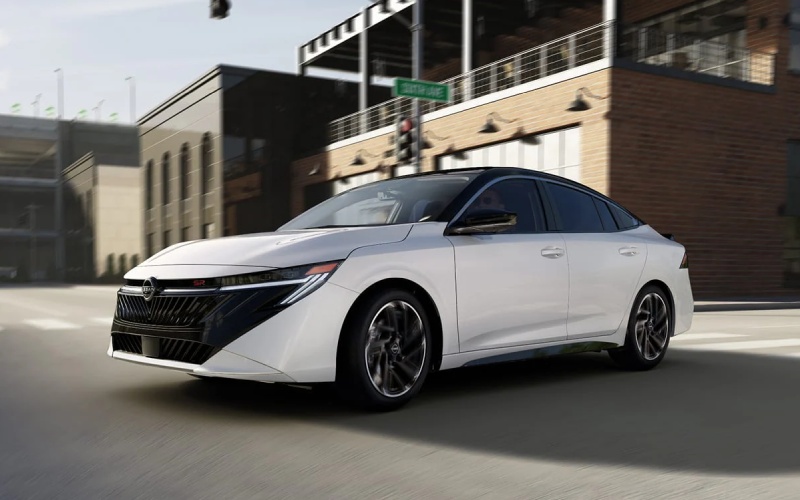
Cherry Hill Nissan - Wireless Clarity for Sicklerville, NJ Drives — 2026 Nissan Sentra’s Big-Screen Tech, Simplified
The 2026 Nissan Sentra brings everyday clarity to Sicklerville, NJ commutes with tech that’s purposeful, intuitive, and truly helpful at a glance. If you’ve ever fumbled with cords, cycled through menus for navigation, or wished your cluster told a richer story in traffic, the Sentra’s digital platform answers the call. Wireless Apple CarPlay and Android Auto are built to be seamless, and the available monolith display unifies your world across dual 12.3-inch screens—vivid gauges directly ahead and an easy-to-reach infotainment touchscreen to the side. It’s a modern, stress-reducing layout that takes the small hassles out of your morning and puts calm back into your daily loop on Cross Keys Road and beyond.
What makes this setup work so well is the way it reduces friction. The Sentra sorts the basics—phone, navigation, music, and driver information—into clean, glanceable spaces. That architecture matters as you roll away from Berlin-Cross Keys Road toward Route 42 or I-295, where quick decisions and light attention shifts keep you confident in traffic. Voice assistants handle core tasks, key prompts sit inside your peripheral vision, and the menus favor big targets and sensible grouping. It’s a system you don’t have to think about, because it was clearly designed for how you actually drive.
Meet the Available Monolith Display
When equipped, the dual 12.3-inch monolith display is one of the Sentra’s most compelling cabin features. It brings a digital instrument cluster and a high-res infotainment touchscreen together so your essential info and entertainment live side-by-side. Customize gauge layouts to prioritize route guidance or driver assistance readouts, and set your main screen for maps, playlists, or podcast apps. The two screens feel co-piloted—what you need, where you need it—without visual clutter. For Sicklerville, NJ commuters, it means fewer taps at traffic lights and quicker confidence when merging onto the Atlantic City Expressway.
Beyond the screens themselves, the Sentra’s overall interaction design helps every driver in the household. Profiles store preferred layouts and favorite apps, so swapping seats between partners is quick. You don’t lose your place, and your main shortcuts stay pinned the way you like them. Think of it as having your personal cockpit ready, no matter who drove last night.
Wireless Apple CarPlay and Android Auto That Just Works
Leave the cords in your bag. The Sentra’s wireless Apple CarPlay and Android Auto make your smartphone feel like a native app suite. Once paired, your go-to navigation, audio, and communication apps populate on the infotainment screen with familiar icons, so there’s no learning curve. Voice control is crisp, too—call a coworker, queue up a playlist, or set a new destination with wake words while keeping your hands on the wheel. And when a plan changes mid-route, natural-language commands help you adapt without digging through menus.
It’s not just about convenience—wireless integration keeps the cabin tidy and your focus sharp. Without a cable to manage, you simply step in, press start, and go. The cabin stays organized, and the phone can remain in the console while the system field-manages your digital life.
Everyday Use Cases Around Town
Morning school drop-offs often mean quick pivots and tight timing. The Sentra’s display lets you check navigation ETA, the next turn, and incoming messages without bouncing between screens. As you loop through local neighborhoods or navigate shopping centers, large icons and logical layouts keep the learning curve low. In parking lots, camera views and guidance reside a tap away for easy maneuvering, while audio fades and alerts help you stay alert to pedestrians and carts.
Heading toward a meeting in Mount Laurel or Blackwood? Save frequent destinations to your favorites and keep a “workday” audio source pinned. When the afternoon return commute starts, switch back to podcasts or a playlist—no scrolling required. The Sentra is built to streamline the routine decisions that can otherwise add up.
Helpful Tips for a Smooth Setup
Set aside a few minutes before your first commute to build your ideal interface. Pair your phone, choose your preferred gauge layout, and pin your top three apps on the home screen. Add a favorite Sicklerville-area coffee stop and your workplace address to your navigation recents. If multiple drivers share the Sentra, create individual profiles so each person’s layouts, favorites, and audio preferences load automatically.
When you want to go deeper, look at how the cluster can complement your main screen. For example, set upcoming turn info or driver-assist indicators in the cluster while your map stretches across the infotainment display. That division of labor keeps core details in sight even if your right-hand screen is on audio or calls.
What About Driver Assistance?
The Sentra’s available ProPILOT Assist works alongside the digital layout to reduce mental strain on longer stretches. Visual indicators in the cluster clarify when assistance is engaged, and prompts are easy to interpret at a glance. When traffic stacks up on Route 42, those cues reinforce smooth, measured responses so you stay confident and composed.
Add available Bose Premium Audio System into the mix and the cabin becomes neatly orchestrated—quiet focus when you need it, immersive sound when you want it. The tech and audio complement each other, building a premium feel that stands out in a compact sedan.
Frequently Asked Questions:
Do I need a cable for smartphone integration?
No. Wireless Apple CarPlay and Android Auto are available, so once you pair your device, you can leave the cord in your bag.
Can different drivers save their own screen layouts?
Yes. The Sentra supports personalized settings for multiple drivers, so your preferred gauge theme and home screen shortcuts load automatically.
Is the monolith display standard?
The dual 12.3-inch monolith display is available on select trims. Ask which configurations pair it with other tech you want.
Will my apps look familiar on the Sentra’s screen?
Yes. CarPlay and Android Auto bring familiar icons and layouts to the main display, so there’s virtually no learning curve.
How does the system help in local driving?
Large targets, sensible menus, and clear driver-assist prompts help with quick decisions in town centers, shopping areas, and when merging onto highways.
If you’re considering a compact sedan oriented around user-friendly tech and real-world ease, the 2026 Nissan Sentra is thoughtfully executed. The harmony between wireless smartphone integration, the available monolith display, and helpful driver cues reduces day-to-day clutter and decision fatigue—especially useful when your routes mix local errands with occasional highway stints. It’s the kind of design that stays out of the way and just works.
When you’re ready to see how this tech feels on your schedule, Cherry Hill Nissan can help you compare trims and set up a route that mirrors your daily drives, serving Blackwood, Sicklerville, and Mount Laurel with tailored test-drive experiences and clear, step-by-step guidance. The best part is how quickly the Sentra’s layout becomes second nature. After a day or two, you’ll wonder why all cars aren’t organized this way.